Built for the way your team works.

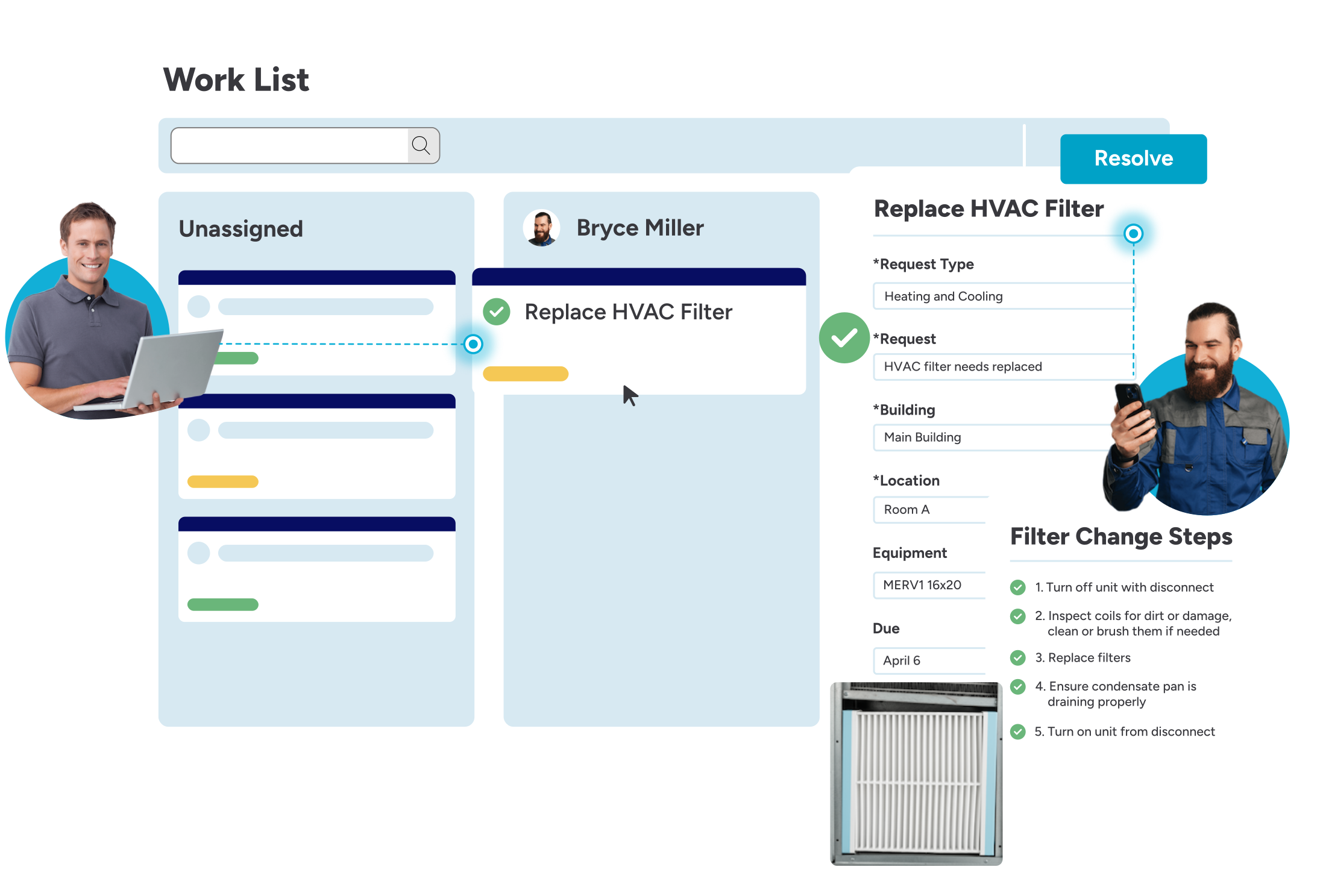
work order software workflow on kanban board: manager prioritizes a task and assigns the work order to a technician, who completes the procedures within the task and marks as resolved on his mobile device

Easy for technicians in the field. Powerful for leaders behind the scenes. One system to get everyone on the same page.

Capterra G2
Based on 400+ reviews
work order software workflow on kanban board: manager prioritizes a task and assigns the work order to a technician, who completes the procedures within the task and marks as resolved on his mobile device

Trusted by leading facilities teams across industries

Joplin Schools

31%

work order resolution time

Polynesian Cultural Center

$450k

annual productivity savings

Ultradent Products, Inc.

50%

work order resolution time

Orlando Sanford International Airport

6x

faster work order resolution time

Click around and see for yourself

work order management system product tour includes a section on work prioritization using kanban style cards

Keep work orders moving

Mobile app

Built specifically for technicians. Manage work orders, resolve requests, view tasks, and access equipment info right from the field.

Automatic routing

Save time and resolve work faster by automatically assigning the best-suited technician for each task.

Worker availability and prioritization

See current assignments, check technician availability and ticket priority, and drag and drop tasks using a visual Kanban-style board.

Notifications and alerts

Stay on top of urgent or time-sensitive tasks with automatic updates and real-time alerts.

Approval chains

Set up optional approval workflows to prioritize incoming work and reduce backlog.

Stay ahead of breakdowns

Preventive maintenance scheduling

Automate service tasks based on time, usage, or inspection triggers to avoid costly breakdowns.

Inspections and checklists

Ensure safety and compliance with regular inspection schedules and repeatable task checklists.

Inventory supply management

Track spare parts and consumables so your team always has the materials needed to get the job done.

Integrated calendar

See upcoming tasks and maintenance schedules across your teams.

Asset tracking

Monitor asset performance, service history, and costs across all locations to support smarter decisions.

Plan with confidence

Custom dashboards and reporting

Move from guesswork to data-driven decisions. Built-in dashboards reveal trends in performance, labor, SLAs, and asset costs so you can plan smarter, justify budgets, and improve accountability.

Cost tracking and analysis

Track labor, inventory, and vendor costs by project, location, or work type to understand where resources are going and why.

Projects and capital improvements

Track large-scale work with Gantt chart-style timelines, primary and sub-task relationships, budget visibility, and labor tracking in one place.

Multi-site visibility

Filter work, reports, and assets by building, campus, or region so you can manage performance across your entire operation.

SLA tracking and compliance

Monitor how teams and vendors perform against SLAs with dashboards that highlight overdue work, response times, and resolution trends.

Vendor and contact management

Manage external vendors with flexible access and clear oversight. Assign work, control what vendors can see and do, and track essential documents like insurance and certifications.

Data you can trust

SOC 2 certified

FMX undergoes regular third-party audits to ensure data is handled securely and responsibly, following strict industry standards.

Reliable backups and uptime

All customer data is backed up every 2 hours and stored in multiple regions. FMX is hosted on Microsoft Azure with a 99.9% uptime commitment.

Role-based access and audit logs

Easily control who sees what across teams and vendors. Every change is logged for visibility and accountability.

Data encryption in transit and at rest

FMX encrypts all data using HTTPS and secure protocols, whether it’s moving between systems or stored in the cloud.

Accessibility built in

FMX follows WCAG 2.1 AA standards to support users with assistive technologies, ensuring equitable access for every technician and administrator.

Schedule a session with an FMX product expert to see how Work Manager can help optimize your operations.
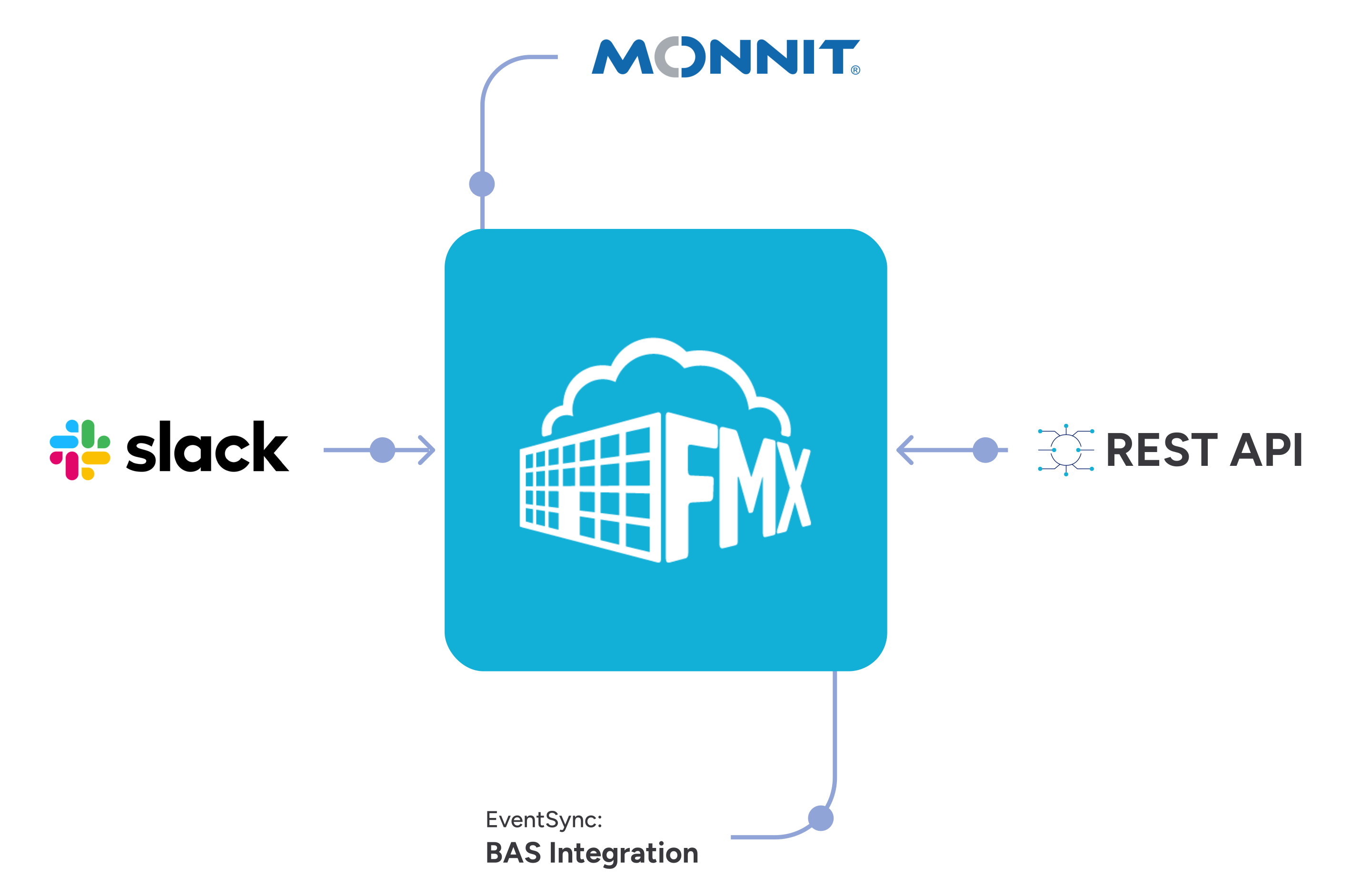
FMX Work Manager integrations include Monnit, Slack, REST API, and BAS integration

Works with the tools you already trust

Connect FMX to your existing systems, from Slack to Monnit Sensors and building automation alerts. Get real-time updates, reduce manual work, and keep teams aligned.

See what our customers say

G2 Grid Leader Summer 2025
Capterra Shortlist 2025
Software Advice FrontRunners 2025
GetApp Category Leaders 2025
Featured Customers 2025 Customer Success Award

Simplified work orders and faster maintenance turnaround


FMX has really simplified how we manage work orders. Everything’s in one place, easy to track in real time, and way more efficient. It’s helped us stay on top of maintenance, cut down delays, and make smarter decisions with the insights we get from tracking and reports.

Dallas Lee Ed.D., Assistant Superintendent

Elementary School District 159, Illinois

Centralized system for faster issue resolution


FMX gives us a central place for work notifications and storage, streamlining communication and saving time, especially helpful for troubleshooting issues like HVAC and network problems in our small district.

Christopher Cerrudo, Director of Technology

Harbor Springs Public Schools, Michigan

Better workflows across multiple facilities


FMX has improved our workflow management and concern tracking, making it easier to stay on top of work needs at each facility.

Brian Leonard, Director of Facilities & Operations

Three Rivers Community Schools, Michigan

Faster work order entry and access


The FMX system is so easy to work with, it takes no time to do work orders, search for things – everything is much easier and faster through FMX.

Georgianne Morgan, Admin Assistant

Wayne Township Public Schools, New Jersey

One platform for visibility and continuous improvement


FMX has unified multiple services under one platform, streamlining requests and approvals while helping us build a valuable history of our facilities and identify both strengths and areas for improvement.

Tim Ziegler, Director of Operations

Governor Mifflin School District, Pennsylvania

Smoother operations across departments


FMX has helped us fine-tune our system across maintenance, facility usage, and support, making everything run more smoothly.

Brent Crispell, Director of Buildings and Grounds

Berwick School District, Pennsylvania

Simplified inventory and user management


Managing users, tracking inventory, and streamlining tickets across departments is much easier now with FMX—no more manual setups or complicated processes.

Josh McNamara, System Analyst II

PAISD, Pennsylvania

Custom dashboards to track weekly progress


Custom filters and the ability to move tickets between modules have made it easy for our techs to find what they need, and the dashboard and reports are perfect for tracking weekly progress.

Stacey Martinez, Systems Analyst

Waller ISD, Texas

Customized forms and smarter task visibility


Creating customized, detailed forms for different departments is simple with FMX, and the ability to tailor visibility helps us manage tasks and inventory with more confidence.

Mimi Delgado, Auxiliary Systems Specialist

Grand Prairie ISD, Texas

Better visibility and task tracking across sites


FMX has helped us stay organized, manage work orders more efficiently, and assign tasks faster. The different views make it easy for staff to track what’s done and what’s pending, and we can now see which sites need more support—whether it’s staffing, time management, or bigger infrastructure improvements.

Rosi Maldonado-Shaqur, Admin Secretary

Goleta Union School District, California

A more streamlined process than SchoolDude


Since switching from SchoolDude to FMX, the requestor side has been much easier to use, especially with the ability to add attachments for events and maintenance tickets. While the maintenance side has room for improvement and the reporting features could be more detailed, overall the process has become more streamlined.

Tim Bonnette, Director of Buildings and Grounds

Pekin Community High School, Illinois

All-in-one system that saves time and boosts use


Having maps, inventory, and easy work order submission all in one system has saved us time and boosted participation, while keeping all departments organized and in sync.

Tony Brace, Facility Director

Central Montcalm Public School, Michigan

$450k annual productivity savings, eliminated time spent organizing, prioritizing and dispatching work


FMX stood above nearly a dozen other facilities and maintenance management solutions. Their ease-of-use, application performance, and customer service were superior in every way.

David Lau, CMMS Systems Administrator

Polynesian Cultural Center

50% reduction in work order resolution time, resolves issues faster with an organized, easy-to-use system.


All CMMS systems are going to have similar functionality—take requests, monitor equipment, schedule preventive maintenance, etc.—but FMX is by far the easiest to use and their amazing customer support sets them above the rest.

Eric Turnbow, Facilities Manager

Ultradent Products Inc.

Why FMX?

We’ll build a strong and lasting partnership with your team.

We understand your needs and priorities, providing full support every step of the way.

Built for the way facilities actually work.

FMX helps your team track work, share knowledge, and make smarter decisions without adding complexity.

Always getting better. With you.

FMX evolves based on your feedback. We ship regular updates, add new features, and improve performance to help your team work more efficiently without disrupting what already works.

Find out more about what makes FMX stand out from the rest:
Ready to take the next step?

See FMX in action and get pricing tailored to your needs.

Frequently asked questions

Is FMX a cloud-based or on-premise solution?

FMX facility management software is cloud-based.

What kind of support does my organization receive with FMX?

We are proud to provide lifetime support to FMX customers. Each customer is assigned a dedicated account manager who meets with them regularly to ensure facilities and maintenance management success.

Our average response time for support tickets is 4 hours, and we are happy to report a 98% customer satisfaction rating.

Do you have a process to address audit recommendations and to ensure compliance with security policies and standards?

Yes, we work with customers to meet their security requirements to the extent that they align with the sensitivity of the data that we store.

Does FMX integrate with other software?

Yes, FMX’s facilities management software integrates with several software systems that will be ready for use out of the box. If we do not already have an integration in place, we offer services to set up an integration for your needs.Additionally, our BAS Integration unlocks the ability to connect our facility scheduling system with your organization’s building automation system.

How frequently is FMX software updated?

Our software development process is iterative and lean, which means we can get changes out very quickly with minimal bugs. In fact, over the past year, we’ve released over 70 updates, averaging one every five days.

Because we have a web app, instead of a native app, these updates occur automatically and don’t require a manual update from users.

How much training will my team receive?

FMX offers webinar training for all FMX users, demonstrating how to submit and close out work requests and configure your personal settings. We also offer optional on-site training and configuration services.

What does the implementation process look like?

The FMX team is highly involved in the implementation process. We work with new customers to import data, set up workflows, configure permission settings and processes to your needs, and more.

The implementation process can take as little as 2 weeks.

How is FMX priced?

Pricing is based on the number of users working on and closing out maintenance requests (or the number of students enrolled for public K-12 schools), and the integrations most important to their organization.