Facility Scheduling, Rental & Reservation Software
Take control of every event, rental, and reservation

Give your team a calendar they can actually trust. No more double-bookings, missed details, or lost invoices.
Find out more about these key features
Trusted by facilities and events teams


Explore the key features of facility scheduling, rental & reservation software


Scheduling & reservations
Manage your requests, approvals, and reservations in one place.
Work from one calendar
Show every event, rental, and reservation on a shared calendar your whole team can access.
Provide self-service booking
Give staff and community members a direct path to submit requests.
Find available space
Search by date, time, and location to see open rooms, fields, and event venues.
Configure forms and approvals
Build request forms and approval chains that match how your team works.
Coordinate transportation
Plan and track vehicle use for field trips, athletics, and community events.
Manage events on the go
Approve requests, check availability, and update details from your mobile device.

Connected workflows
Bring together scheduling, access control, building automation, invoicing, payments, and team communication.
Sync your existing tools
Connect to your athletic scheduling, access control, building automation, and accounting systems.
Send invoices and collect payments
Generate invoices and process payments in the same place you manage your events.
Track communication threads
Add questions, updates, and details directly to events, where everyone can see them.
Automate work tasks
Kick off setup, cleanup, and tech work orders the moment an event gets approved.
Reporting & insights
Spot conflicts, track usage, and back your decisions with real-time data.
Catch scheduling conflicts
Flag overlapping requests or times before they hit your calendar.
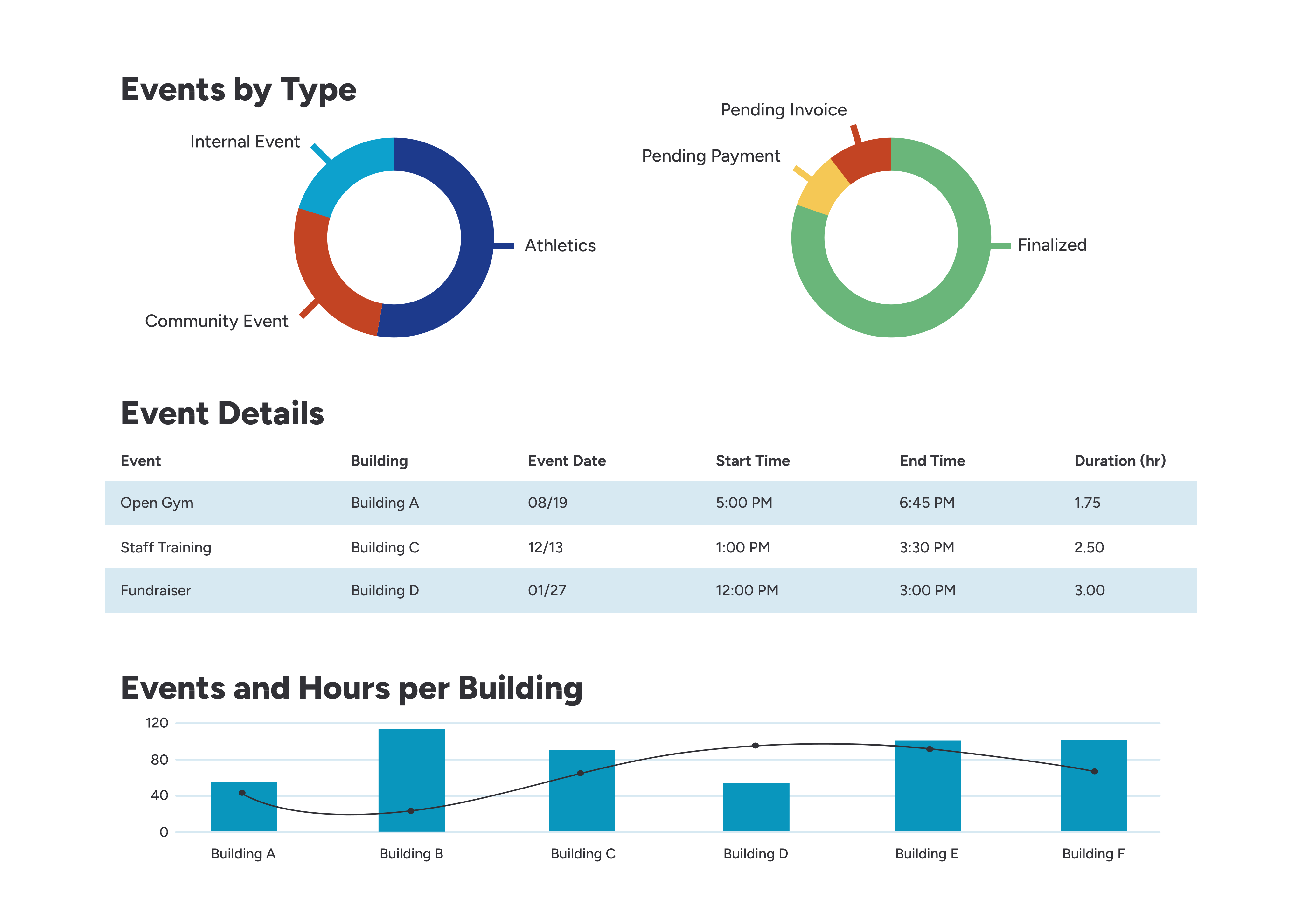
Explore interactive dashboards
Track facility usage, rental revenue, and request trends.
Share reports with stakeholders
Send built-in reports to leadership, the board, and your team.
Send post-event surveys
Collect feedback from requesters to improve future events.
Reports to monitor facility scheduling, rentals & reservations


Frequently asked questions about facility scheduling, rental & reservation software
What is facility scheduling software?
Facility scheduling software runs your event calendar—from meetings and community rentals to athletic practices and board sessions. The software helps you manage request forms, approvals, availability checks, resources, invoices, and payments. Done right, it replaces spreadsheets, shared inboxes, text chains, and binders with one calendar that everyone can trust.
Why do we need facility scheduling software?
Manual scheduling stops working faster than you’d think. Double-bookings happen. Setup details get missed. Invoices fall through the cracks.
Facility scheduling software gives your team easy access to the information they need, so the basketball game and bake sale don’t end up in the gym at the same time.
How should we choose facility scheduling software?
Start with a workflow you actually run, not a feature checklist:
- Can the request form match yours?
- Can you build approval chains that mirror your real chain of command?
- Will requesters, technicians, and leadership see what they need without logging into three different places?
- Can community members book their own rooms?
- Can you collect payments?
Next, make sure the software talks to the other systems you use every day. And look for a vendor whose support team provides hands-on training during rollout and fast response times after you’re live.
What is the best facility scheduling software?
The best software is the one your team will actually use. Most rollouts fail because the software is too complicated for the part-time admin who manages room reservations or too rigid for the facilities director who needs custom approval logic.
Look for software flexible enough to match your current process, simple enough that requesters don’t need a tutorial, and connected enough to talk to your other systems.
How can we build a business case for facility scheduling software?
Figure out what manual scheduling actually costs you. Hours your admin spends sending emails and rebuilding the calendar. Setup mistakes that pull technicians off other work. Rental revenue you’ve left on the table because community members couldn’t figure out how to book. Late or missing invoices. Energy bills for events that ended hours ago.
Add it up. Then put it next to the cost of the software. This usually makes the case for you.
What is the ROI of facility scheduling software?
ROI usually shows up in three places:
- Time: Your team gets hours back every week when requesters self-book and approvals route automatically.
- Costs: You save money when HVAC and lighting only run when people are in the building.
- Revenue: You earn more money when community members actually book your spaces, and invoicing stops falling through the cracks.
Most organizations recover the software’s annual cost from one or two of these buckets alone
How much does facility scheduling software cost?
Most facility scheduling software is priced based on the size of your organization—square footage, number of buildings, number of users, or some combination. Providers usually run a software as a service (SaaS) model with a predictable annual subscription fee.
As you explore options, watch out for two facility scheduling software pricing models that often cost more than they appear to:
- Revenue-share pricing: Vendors take a percentage of every rental dollar you collect.
- “Free” tools: Vendors recoup their costs by charging processing fees, capping features, or selling your data.
Products built for facility scheduling, rentals & reservations
FMX’s suite of products helps you get the most of your facilities and events.


Connect with a product specialist to learn how FMX can help you plan, manage, and optimize your operations.
FMX vs. single-purpose tools
- FMX
- Single-purpose tools
One-stop shop
Manage scheduling, reservations, invoices, payments, work orders, and PMs all in the same platform.
- FMX
- Single-purpose tools
Configurability
Create request forms and approval workflows based on your team’s specific needs.
- FMX
- Single-purpose tools
Built for facilities
Get more done with software designed for facilities management and events teams.
- FMX
- Single-purpose tools
Customer support
Hit the ground running with hands-on training and a dedicated customer success team.
- FMX
- Single-purpose tools
See why customers run their events with FMX
Benefits of facility scheduling, rental & reservation software
- No double-bookings
- One shared calendar
- Self-service requests
- Custom approval chains
- Built-in invoicing and payments
- All-in-one communication
- Capture rental revenue
Learn more about facility scheduling, rental & reservation software

Talk with a product expert
Take control of every event, rental, and reservation
Frequently asked questions about FMX
Is FMX’s solution a standalone product?
Yes, FMX Event Manager is a standalone product. However, it’s even more effective when paired with FMX Work Manager to solve comprehensive facilities management pain points.
Many organizations start with Event Manager for scheduling, rentals, and reservations, then layer in other products as the wins stack up. With Work Manager, it’s the same calendar, same data, and same login.
How is FMX facility scheduling software priced?
FMX pricing is based on the number of products you use and the number of users in the system. Pricing for public K–12 school districts works a little differently—pricing is based on enrolled student count rather than user count.
Is FMX a cloud-based or on-premise solution?
All FMX facility management software is cloud-based. Learn more about the benefits of cloud-based software.
Does FMX integrate with other systems?
Yes, FMX integrates with several other software systems, including academic calendars, athletic scheduling, access control, building automation, and finance. If we don’t already have an integration in place, we offer services to set up an integration based on your needs. See integrations.
Is FMX easy for non-technical employees to use?
Yes, FMX customers consistently call out the interface as one of the reasons they love our software. Even non-technical users find it easy to get started. If adoption is a concern, we also offer on-site training to get your team up and running.
Why is FMX the best facility scheduling software for us?
FMX is built around the day-to-day needs of facilities teams:
- Central calendar
- Self-service booking
- Approval chains
- Communication threads
- Automations and integrations
- Built-in invoicing and payments
- Interactive dashboards
FMX is configurable enough to match how your team already works and it lives in the same system as your work orders, PMs, inventory, and capital plans.
How frequently is FMX software updated?
FMX’s development cycle is iterative and lean, which means changes ship fast and bugs are rare. Over the past year, we’ve shipped more than 70 updates—roughly one every five days. And because FMX is a web app, not a native app, those updates happen automatically. No need for manual updates on your end.
How long does it typically take to implement FMX?
FMX builds implementation plans around a 60-day timeline. That said, the actual timeline depends on a few key factors: how complex your operation is, how clean your data is, and how much bandwidth your team can dedicate to the project.
What training and support is included in FMX?
When you sign on with FMX, a dedicated Customer Success Manager walks you through the whole onboarding process: kickoff, data review, pre-site configuration, admin training, and rollout to the broader team. FMX customers report a 98% satisfaction rating and an average two-hour response time on support tickets.