Put your facilities to work

FMX Event Manager provides a reservation finder feature, invoicing, and facility scheduling workflows

Turn your spaces into organized, revenue-generating assets.

Capterra G2
Based on 400+ reviews
FMX Event Manager provides a reservation finder feature, invoicing, and facility scheduling workflows

Watch a quick tour of rental & reservation features

Smarter scheduling

Self-service booking

Offer staff and community members the ability to submit reservation requests for buildings, fields, classrooms, or any schedulable space.

Configurable approval workflows

Route requests for review based on resource, building, or event type to get the right people involved.

Conflict detection

Avoid scheduling conflicts with built-in tools that flag overlapping events or times.

Reservation Finder

Make it easier to reserve space with details like photos, capacity, and rental info.

Mobile access

Request, manage, or approve events on the go from any device.

Connected operations

Prebuilt connections

Connect FMX to the systems you already use for scheduling, athletics, access control, BAS and more. Every Event Manager package includes one integration at no additional cost.

Built-in invoicing and payments

Invoice for facility rentals and collect payments online. Handle single events or multi-date reservations with ease.

Automated work tasks

Configurable fields trigger work tasks across departments based on the requester’s needs.

Transportation requests

Plan and track vehicle use for field trips, athletics, and community events.

Liability insurance management

Collect and store required documents for rentals and event requests.

Custom forms and request types

Capture the right details from each requester with forms tailored to your process.

Actionable insights

Interactive dashboards

Monitor usage trends by building, resource, or event type.

Facility usage reports

Identify which spaces are used most often and which sit empty so you can plan more strategically.

Invoice summaries

Stay on top of payments and outstanding balances.

Custom filters and exports

Filter by date range, department, or requester type to get the exact data you need.

Survey feedback

Collect post-event responses to improve scheduling and operations over time.

Data you can trust

SOC 2 certified

FMX undergoes regular third-party audits to ensure data is handled securely and responsibly, following strict industry standards.

Reliable backups and uptime

All customer data is backed up every 2 hours and stored in multiple regions. FMX is hosted on Microsoft Azure with a 99.9% uptime commitment.

Role-based access and audit logs

Easily control who sees what across teams and vendors. Every change is logged for visibility and accountability.

Data encryption in transit and at rest

FMX encrypts all data using HTTPS and secure protocols, whether it’s moving between systems or stored in the cloud.

Accessibility built in

FMX follows WCAG 2.1 AA standards to support users with assistive technologies, ensuring equitable access for every technician and administrator.

Schedule a session with an FMX product expert to see how Event Manager can help optimize your event scheduling workflows.
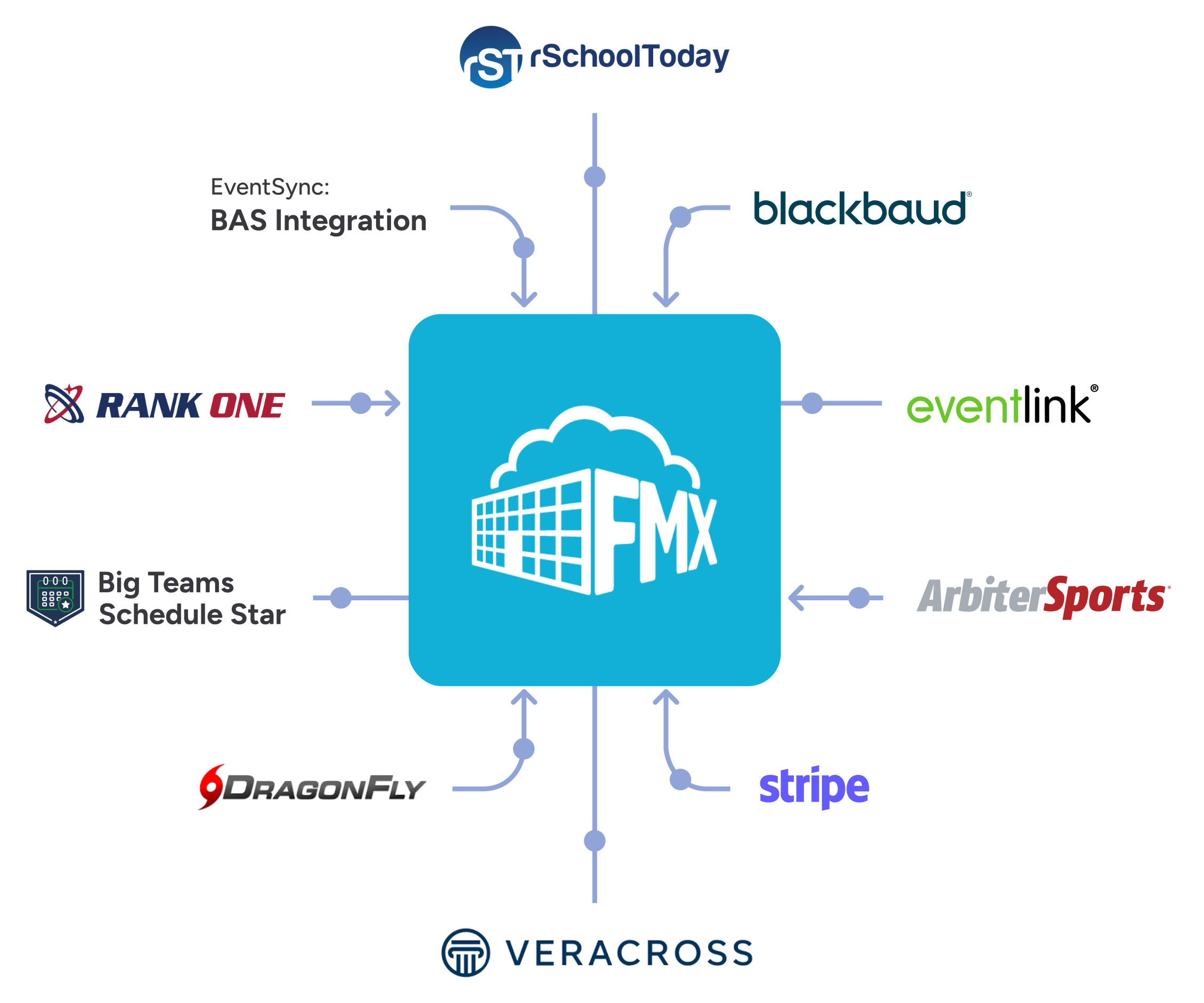
FMX Event Manager integrates with rSchoolToday, Blackbaud, Eventlink, ArbiterSports, Stripe, Veracross, DragonFly, BigTeams Schedule Star, Rank One, and FMXconnect BAS Integration

Works with the tools you already trust

Connect FMX Event Manager with your event scheduling and BAS for a fully automated, seamless experience for occupants and guests.

See what our customers say

G2 Grid Leader Summer 2025
Capterra Shortlist 2025
Software Advice FrontRunners 2025
GetApp Category Leaders 2025
Featured Customers 2025 Customer Success Award

$700K projected annual savings


If we have an evening of events, FMX can help us turn on the air conditioning ahead of the event, and turn it off afterward. It helps us track resources used, inventory consumed, and communicate with everyone involved, both internal and external to the district. It’s been a game-changer, and we’re just getting started.

Karla Slovitsky, Director of Business Services

J.O. Combs Unified School District, Arizona

“The biggest benefit is we all know what's happening on campus.”


With the FMX one-stop shop facilities calendar, we ensure not only that students, faculty, and staff are aware of events, but also event planners are gathering important information so that they can have a successful event.

Matthew D’Oyly, Director of Events and Conferences

Otterbein University, Ohio

One calendar. Full visibility.


We’ve finally streamlined support service requests and built a master calendar, and the detailed reporting gives us a much clearer view of who’s using our facilities and when.

Dr. Nicole McClure, Director of Communications

Phoenixville Area School District, Pennsylvania

No more booking mix-ups


FMX solved our double-booking issues, simplified rental invoicing, and helped us inventory assets and perform scheduled maintenance—all while giving us data we can use for future planning.

Angela Sierra, Administrative Assistant

SDoL, Pennsylvania

Easier for requestors


Since switching from SchoolDude to FMX, the requestor side has been much easier to use, especially with the ability to add attachments for events and maintenance tickets.

Tim Bonnette, Director of Buildings and Grounds

Pekin Community High School, Illinois

Data you can actually use


Having all our data in one place has saved us tons of time, and the user-friendly system makes it easy to track service history and generate helpful reports, like how often our facilities are used after hours.

Jade Gugliotta, Support Services Secretary

South Western School District, Pennsylvania

Why FMX?

We’ll build a strong and lasting partnership with your team.

We understand your needs and priorities, providing full support every step of the way.

Built for the way facilities actually work.

FMX helps your team track work, share knowledge, and make smarter decisions without adding complexity.

Always getting better. With you.

FMX evolves based on your feedback. We ship regular updates, add new features, and improve performance to help your team work more efficiently without disrupting what already works.

Find out more about what makes FMX stand out from the rest:

Ready to take the next step?

See FMX in action and get pricing tailored to your needs.

Frequently asked questions

Does FMX Event Manager integrate with athletic scheduling software?

Yes, Event Manager integrates with ArbiterSports, BigTeams Schedule Star, Blackbaud, DragonFly, Eventlink, Rank One, rSchoolToday, and more. With the integration, you can see all events from one centralized calendar within FMX.

Is FMX a cloud-based or on-premise solution?

FMX facility management software is cloud-based.

What kind of support does my organization receive with FMX?

We are proud to provide lifetime support to FMX customers. Each customer is assigned a dedicated account manager who meets with them regularly to ensure facilities and maintenance management success.

Our average response time for support tickets is 4 hours, and we are happy to report a 98% customer satisfaction rating.

Do you have a process to address audit recommendations and to ensure compliance with security policies and standards?

Yes, we work with customers to meet their security requirements to the extent that they align with the sensitivity of the data that we store.

Does FMX integrate with other software?

Yes, FMX’s facilities management software integrates with several software systems that will be ready for use out of the box. If we do not already have an integration in place, we offer services to set up an integration for your needs.Additionally, our BAS Integration unlocks the ability to connect our facility scheduling system with your organization’s building automation system.

How frequently is FMX software updated?

Our software development process is iterative and lean, which means we can get changes out very quickly with minimal bugs. In fact, over the past year, we’ve released over 70 updates, averaging one every five days.

Because we have a web app, instead of a native app, these updates occur automatically and don’t require a manual update from users.

How much training will my team receive?

FMX offers webinar training for all FMX users, demonstrating how to submit and close out work requests and configure your personal settings. We also offer optional on-site training and configuration services.

What does the implementation process look like?

The FMX team is highly involved in the implementation process. We work with new customers to import data, set up workflows, configure permission settings and processes to your needs, and more.

The implementation process can take as little as 2 weeks.

How is FMX priced?

Pricing is based on the number of users working on and closing out maintenance requests (or the number of students enrolled for public K-12 schools), and the integrations most important to their organization.